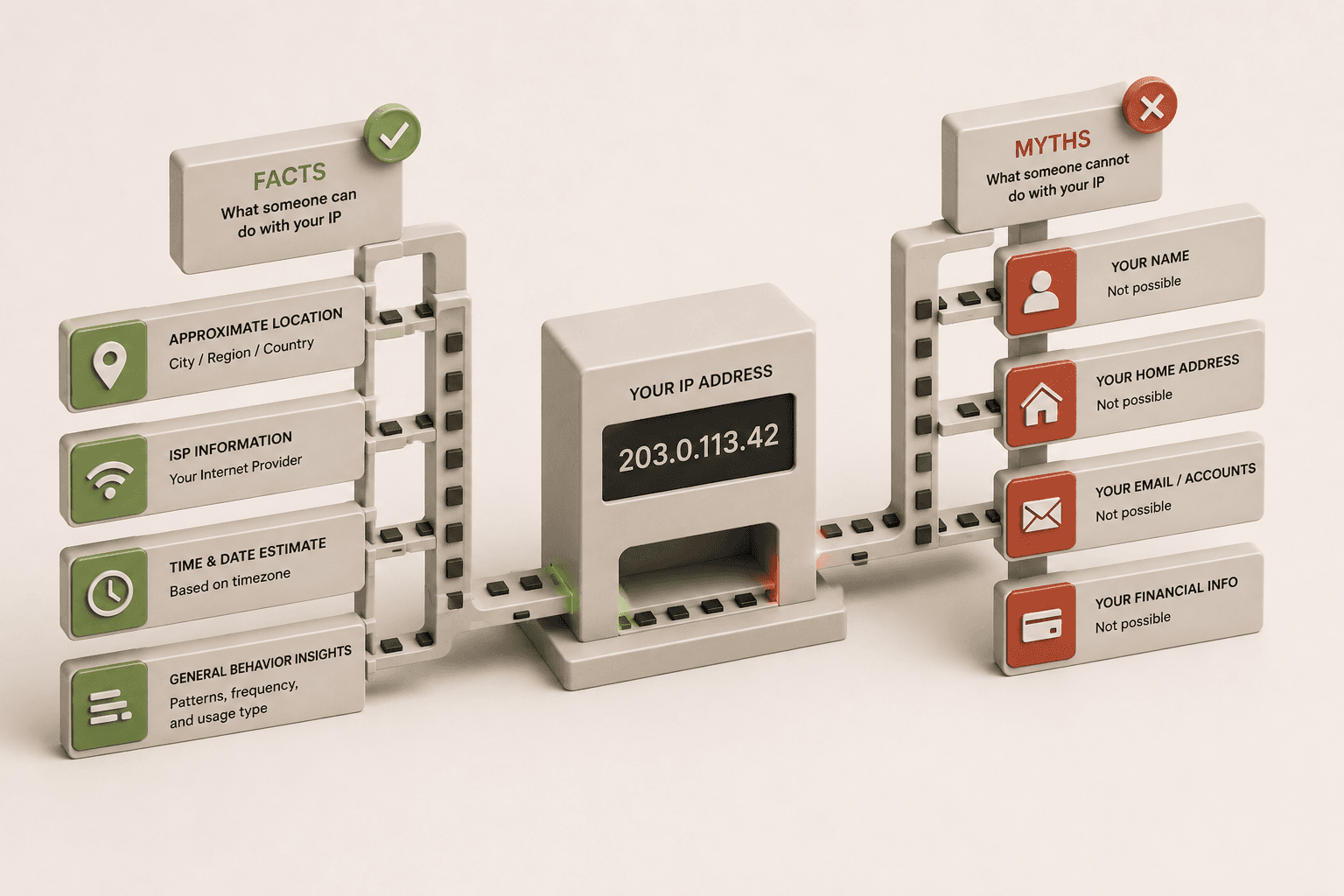
If someone has your IP address, they can only see limited public routing information, such as your approximate geographic region (like your city or state) and the name of your Internet Service Provider. An IP address alone does not reveal your name, your physical street address, or grant someone direct access to hack your personal device.
Can Someone Find My Exact Location From My IP Address?
No, someone cannot find your exact street address or home location using only your IP address. At most, an IP address reveals your approximate geographic location, which is usually accurate only down to the city, regional, or state level depending on how your internet provider routes your connection.
When you use a tool to track an IP address, the system checks public databases maintained by regional internet registries. These registries log which Internet Service Provider (ISP) owns that specific block of addresses and the general geographic area where those addresses are deployed. Because IP addresses are assigned dynamically by ISPs to manage broad coverage areas, the physical location associated with an IP often points to a central routing facility or an ISP data center miles away from you, rather than your specific router.
Can Someone Hack My Device Just From My IP Address?
An IP address alone is not enough for someone to hack your phone or computer. Having your IP address simply tells an attacker where your network is located on the internet, but modern home routers act as a firewall, automatically blocking unsolicited incoming traffic and protecting your personal devices from direct access.
To actually compromise a device, a hacker would need far more than just a stolen IP address. They would have to find a specific, unpatched vulnerability in your router's firmware, or trick you into downloading malicious software that opens a connection from the inside out. Your IP address is merely a public routing number, similar to a public phone number. Just as knowing someone's phone number doesn't allow you to listen to their conversations or unlock their house, knowing an IP address does not bypass the fundamental security protocols built into modern operating systems and network hardware.
Can Someone DDoS Me If They Have My IP?
Yes, if someone has your IP address, they could theoretically target your network with a Distributed Denial of Service (DDoS) attack, though this is a very low-probability risk for the average home internet user. A DDoS attack involves flooding your IP address with an overwhelming amount of junk traffic in an attempt to slow down your connection or knock your router offline temporarily.
While having your IP address "hacked" in this manner sounds alarming, DDoS attacks require significant resources to execute and are almost exclusively targeted at high-profile targets like corporate websites, online services, or competitive multiplayer gamers during high-stakes matches. If you are an average user browsing the web, you are highly unlikely to be targeted. Also, most residential ISPs dynamically assign IP addresses, meaning that simply restarting your modem will often grant you a new IP address, instantly stopping the attack by rendering the old target address useless.
Should I Be Worried If My IP Address Was Exposed?
In most cases, you should not be worried if your IP address is exposed, because it is not a secret piece of information. Your IP address is meant to be public - it is the foundational mechanism that allows websites to know where to send the text, images, and videos you request when browsing the web.
While it is entirely normal for your IP address to be visible to the services you interact with, privacy-conscious users can take simple, reasonable precautions to manage their digital footprint. If you want to obscure your geographic location or prevent websites from building a profile based on your IP, you can route your traffic through a trusted Virtual Private Network (VPN). To maintain strong baseline security against any theoretical network scanning, ensure your home router's firmware is kept up to date and that you use a strong, unique password for your router's administrative dashboard.
How Do People Get Your IP Address?
People and services get your IP address automatically, because every website, app, or online game you connect to must see your IP address in order to communicate with your device. It is not a special hack or a sophisticated breach; it is simply how the fundamental architecture of the internet operates.
When you type a URL into your browser or send a message through an app, your device sends a data packet containing your request and your return address (your public IP). The receiving server logs this address so it knows exactly where to send the webpage or response back. Consequently, every website administrator, forum moderator, and multiplayer game server host can inherently see the IP addresses of the users connecting to their platforms.
Check What Your IP Address Currently Reveals
If you want to see exactly what information is publicly visible when you connect to a website, you can check your own connection footprint safely and instantly. This is a helpful way to understand the limitations of IP geolocation and verify if a VPN is successfully masking your identity.
- Look up your current IP:Open our What Is My IP diagnostic tool. When the page loads, it asks, "Is this my IP address?" and instantly displays the exact IPv4 and IPv6 addresses you are currently broadcasting to the internet.
- Review your network details:The tool will show you the name of your Internet Service Provider and your Autonomous System Number (ASN). This is the exact same public data that any website or server can see when you connect to them.
- Check your approximate location:You will also see a map and a listed region based on public geolocation databases. You will likely notice that the location points to a broad city or region, definitively demonstrating that an IP address cannot pinpoint your exact street address.
Related Reading
- Why Does My IP Address Keep Changing?
Learn why ISPs use dynamic IP assignment and why a changing IP is actually a benefit for your online privacy.
- How to Know if Your VPN is Actually Working
A complete guide to understanding VPN tunnels and how to properly verify that your real IP address is hidden.
Useful Tools
- What Is My IP
Instantly check your public IPv4 and IPv6 addresses to see exactly what network information your browser is exposing to the websites you visit.
- VPN Check
A step-by-step diagnostic tool that intentionally tests your browser to ensure it isn't leaking your original IP address while connected to a VPN.