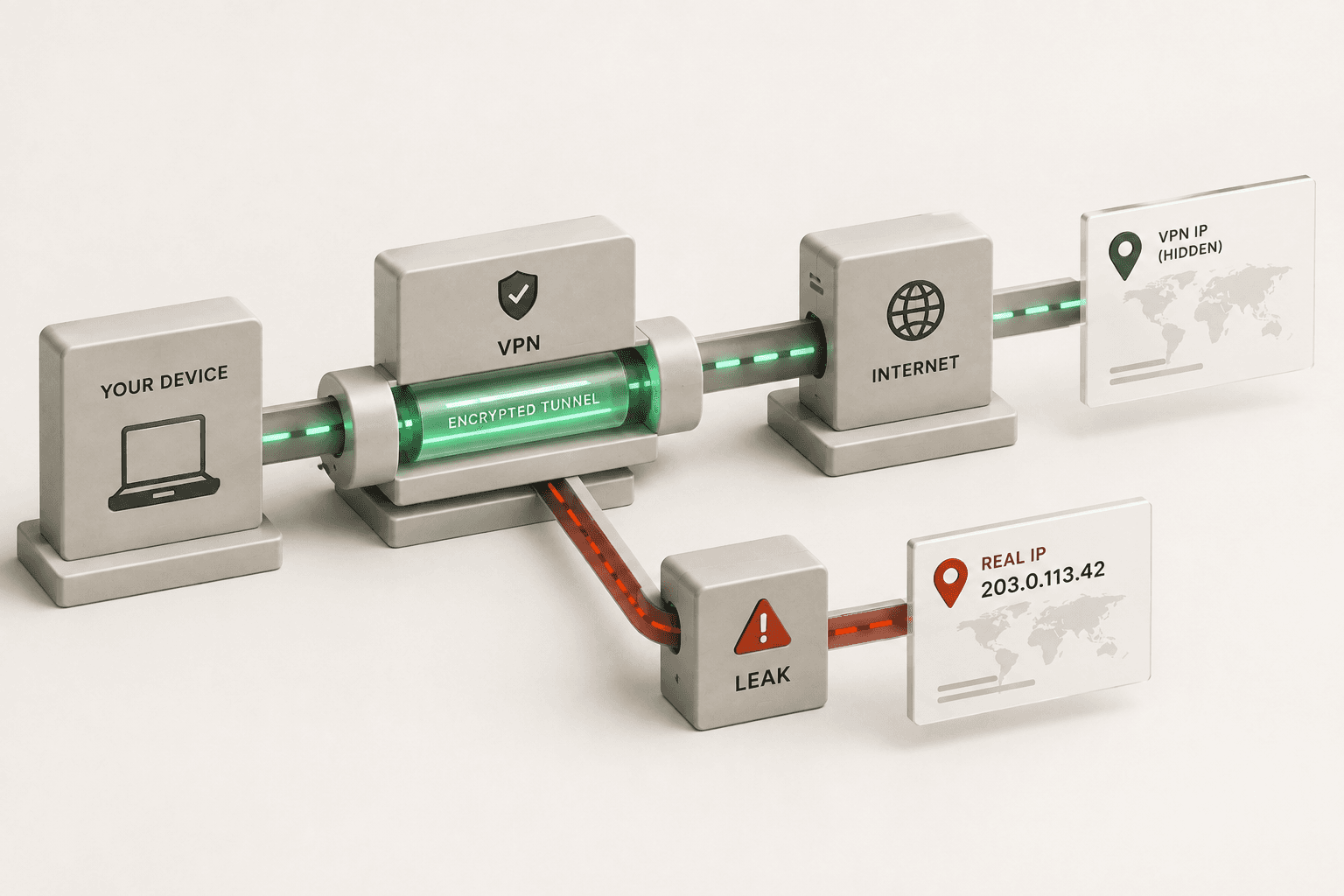
To know if your VPN is actually hiding your IP address, you must run a baseline diagnostic test on your naked connection, connect to your VPN, and then run the exact same diagnostic test again to ensure your original IP, IPv6, and WebRTC data have completely changed. If any of the original numbers bleed through to the second test, your VPN is leaking and failing to hide your identity.
Does my VPN provider see my real IP address?
Yes, your VPN provider always sees your real IP address because your device must create a direct, physical connection to their servers in order to route your traffic. While the websites you visit will only see the IP address of the VPN server, the VPN company itself holds the encrypted tunnel and knows exactly where the connection originated.
This is why a VPN's "no-logs" policy is critical; it is a promise that they delete the record of your real IP address matching your browsing activity rather than storing it.
Is my VPN leaking my true identity?
Your VPN is leaking your true identity if it fails to route all types of network traffic through its encrypted tunnel, allowing your browser or operating system to broadcast your real IP address alongside the fake one.
The most common culprits for this are WebRTC (a browser feature that facilitates real-time video and audio) and IPv6 (the newer standard for IP addresses that some older VPN protocols ignore). If your VPN only protects standard IPv4 web traffic but ignores the rest, websites can easily see around the VPN and identify exactly who you are.
Why isn't my VPN hiding my IP address completely?
Your VPN isn't hiding your IP address completely because modern web browsers have built-in APIs that can accidentally bypass network-level encryption if they are not specifically blocked.
For example, if a website asks your browser for a direct peer-to-peer connection, your browser may hand over your true, underlying IP address (a WebRTC leak) regardless of whether your VPN software is turned on. Similarly, if your ISP assigns you both an IPv4 and an IPv6 address, but your VPN only knows how to mask IPv4, your true IPv6 address will remain completely exposed.
How to test if your VPN is legitimately hiding your IP
To verify your VPN is legitimate and actively masking your digital footprint, you should run a controlled "before and after" test. Do not just turn the VPN on and assume it works. Follow this three-step checklist:
- Establish your unprotected baseline:Turn your VPN completely off. Go to the Aivorize Tools VPN Check and click "Record baseline". The tool will record your real IPv4 address, your IPv6 address (if you have one), and any local WebRTC candidates. Leave this tab open.
- Connect to your VPN:Open your VPN application and connect to a server of your choice. Wait for the connection to fully stabilize.
- Run the active leak test:Return to the open tab and click "I am connected, run the check". The tool will ping your connection again and compare the results side-by-side against your baseline.
If the test is successful, your primary IP address will have changed to the VPN's server, your WebRTC test will show as secured, and your IPv6 address will either be successfully masked or safely blocked. If the tool detects your original baseline IP anywhere in the results, your VPN is leaking.
Run the VPN Diagnostic NowWhy would my VPN show the wrong IP or location?
Your VPN will show the wrong IP or location if the third-party geolocation databases used by websites have outdated or incorrect mapping for the VPN's server block.
IP addresses do not have physical GPS coordinates hardcoded into them; instead, companies maintain massive lookup tables guessing where an IP is based on telecom registration data. If your VPN provider recently purchased or moved a block of IP addresses, a website might mistakenly read the IP's old location instead of the new one until those external databases update.
Can a website tell I am using a VPN to hide my IP?
Yes, a website can usually tell you are using a VPN to hide your IP because VPN IP addresses are registered to massive commercial data centers rather than residential internet service providers (ISPs).
When a website checks your connection, it sees that your traffic is originating from a hosting provider like Amazon Web Services or DigitalOcean rather than a local telecom like Comcast or AT&T. While they cannot see who you really are, this commercial signature is enough for streaming services and banks to flag the connection as an anonymizing proxy and potentially block your access.
Related Reading
- Is My IP Address Exposed Online Right Now?
A deeper look at what it actually means for an IP to be "exposed" and when you should care.
- How to Test WebRTC Leaks in Your VPN Connection
Detailed mechanics on why browsers bypass VPNs and how to plug the hole.
- What Can Someone Do With Just My IP Address?
Separating the Hollywood hacking myths from the actual privacy risks.
Useful Tools
- VPN Check Tool
Run a before-and-after comparison to guarantee your VPN is routing traffic securely.
- What Is My IP Diagnostic
See exactly what network signals, geolocation data, and ASN ownership your connection broadcasts.
- WebRTC Leak Test
Force your browser to check its real-time communication APIs for underlying IP exposure.