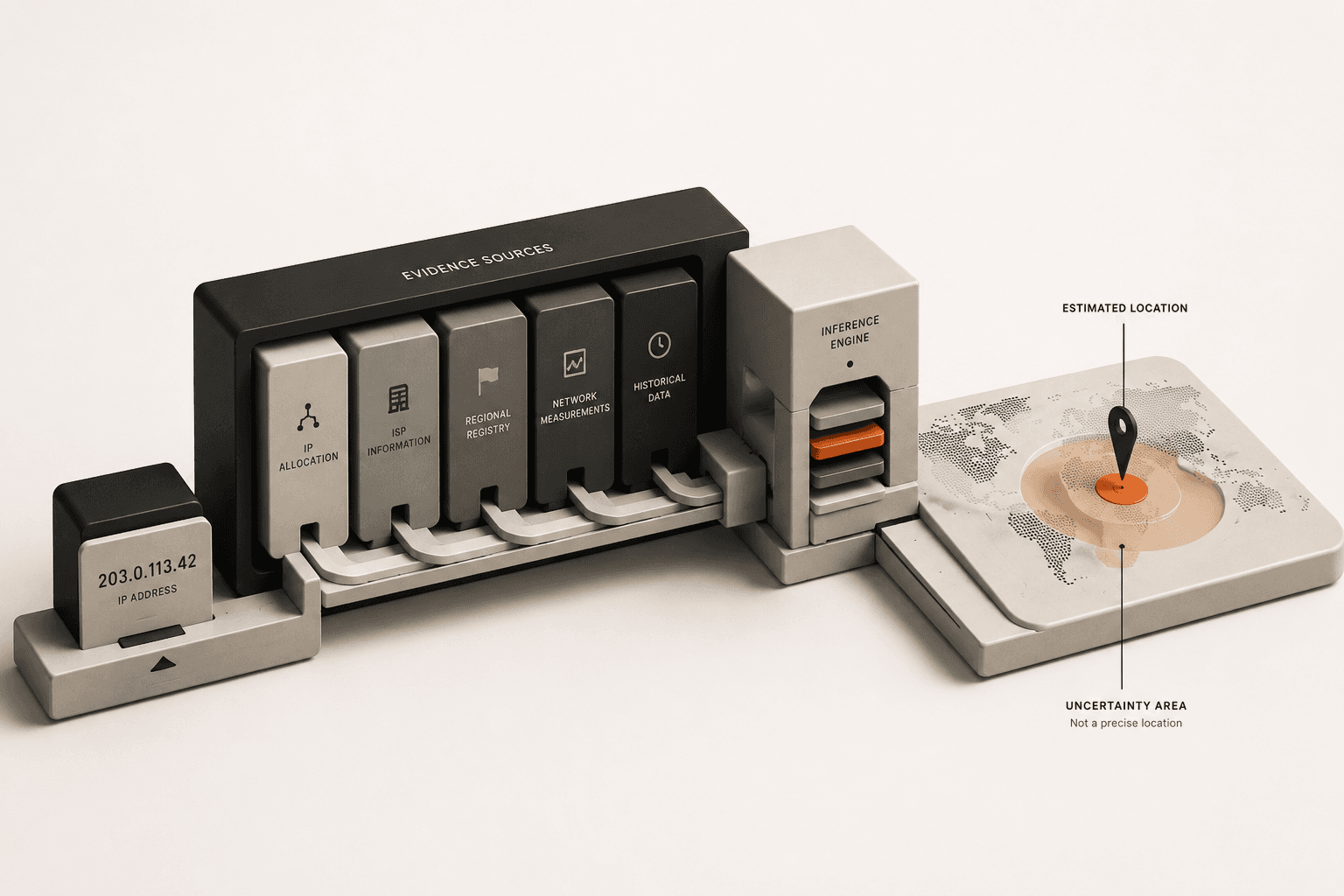
IP geolocation works by cross-referencing your public IP address against commercial lookup tables that record where an Internet Service Provider registered each block of network addresses - not by tracking your device directly. That indirect method is exactly why the result is a rough estimate, not a GPS-precise dot on a map, and why it can be confidently wrong.
How Does IP Geolocation Actually Work?
IP geolocation says you are located in a broad geographic region - usually a city or metropolitan area - based entirely on the network infrastructure of your telecom provider. It does not use satellite GPS, Wi-Fi triangulation, or any hardware sensors inside your device to determine where you physically are.
The result you see is simply the registered location of the commercial data center or ISP routing hub handling your connection. An IP address is fundamentally a network routing number, not a geographic coordinate. The internet only uses it to know where to send your data packets, while third-party companies reverse-engineer that routing data to guess your physical country, state, and city.
What Are Geolocation Database Providers?
Geolocation database providers are specialized data companies that build massive lookup tables mapping every known IP address to a physical region. Because there is no official, global registry that dictates exactly where every single residential IP address lives, these companies have to piece the puzzle together themselves using public and private data sets.
They gather this IP data by analyzing public telecommunications registration records (such as when a major telecom formally buys a block of addresses for a specific state), scanning network routing paths, and partnering with web platforms to see where traffic actually originates.
When you visit a weather website or a streaming service, that site doesn't trace the wire back to your house. Instead, it instantly asks a geolocation database provider to look up your IP address and return the city listed for it in their records.
Why Do Geolocation Results Drift From Your Real City?
These third-party IP databases are educated guesses, not real-time trackers, and they are built from the ISP-hub routing pattern described above. That is also why the same IP can show a different city on two different websites, why mobile connections drift the most, and why a recently reassigned IP block can be wrong for weeks before databases catch up.
For the full breakdown of each specific cause - ISP routing, mobile carrier gateways, CGNAT, and VPNs - see Why Does My IP Address Show the Wrong City?
Does My IP Address Show My Exact Address or Zip Code?
No, your IP address does not show your exact street address, your name, or a highly accurate zip code. At best, an IP address can reliably identify the general metropolitan area you are located in and the company providing your internet connection.
While some IP lookup tools will display a zip code alongside your IP address, that code is merely the central postal code for the city where your ISP's routing hub is located. It is not the zip code of your physical house. Unless a website asks your browser for explicit GPS permissions (which triggers a popup on your screen), a stranger or a website cannot find your front door using just your public IP address.
How Do I Check My IP Address and Location?
If you want to see exactly what location data your current internet connection is broadcasting to the world, you can query a live geolocation database right now using our built-in diagnostic tool.
- Find your public IP:Open the What Is My IP tool. The system will instantly ping your browser and reveal the exact IPv4 or IPv6 address the internet currently sees.
- Check the IP location data:The tool queries standard geolocation databases to display the country, region, and estimated city tied to that IP. Notice how it likely names a nearby major city rather than your exact suburb.
- Verify your ISP:Review the ASN (Autonomous System Number) and ISP name. This confirms which telecommunications company actually owns the IP block you are currently borrowing, which heavily influences the location displayed.
Related Reading
- Why Does My IP Address Keep Changing?
Understand why your IP and estimated location can suddenly shift when you move from Wi-Fi to cellular data.
- What Can Someone Do With Just My IP Address?
Find out what hackers and strangers can and cannot do with your IP address, separating Hollywood myths from reality.
Useful Tools
- What Is My IP Location
Query your connection to see exactly which city and ISP the geolocation databases think you belong to.
- VPN Check
Verify that your IP location successfully changes to a new region after connecting to a VPN server.