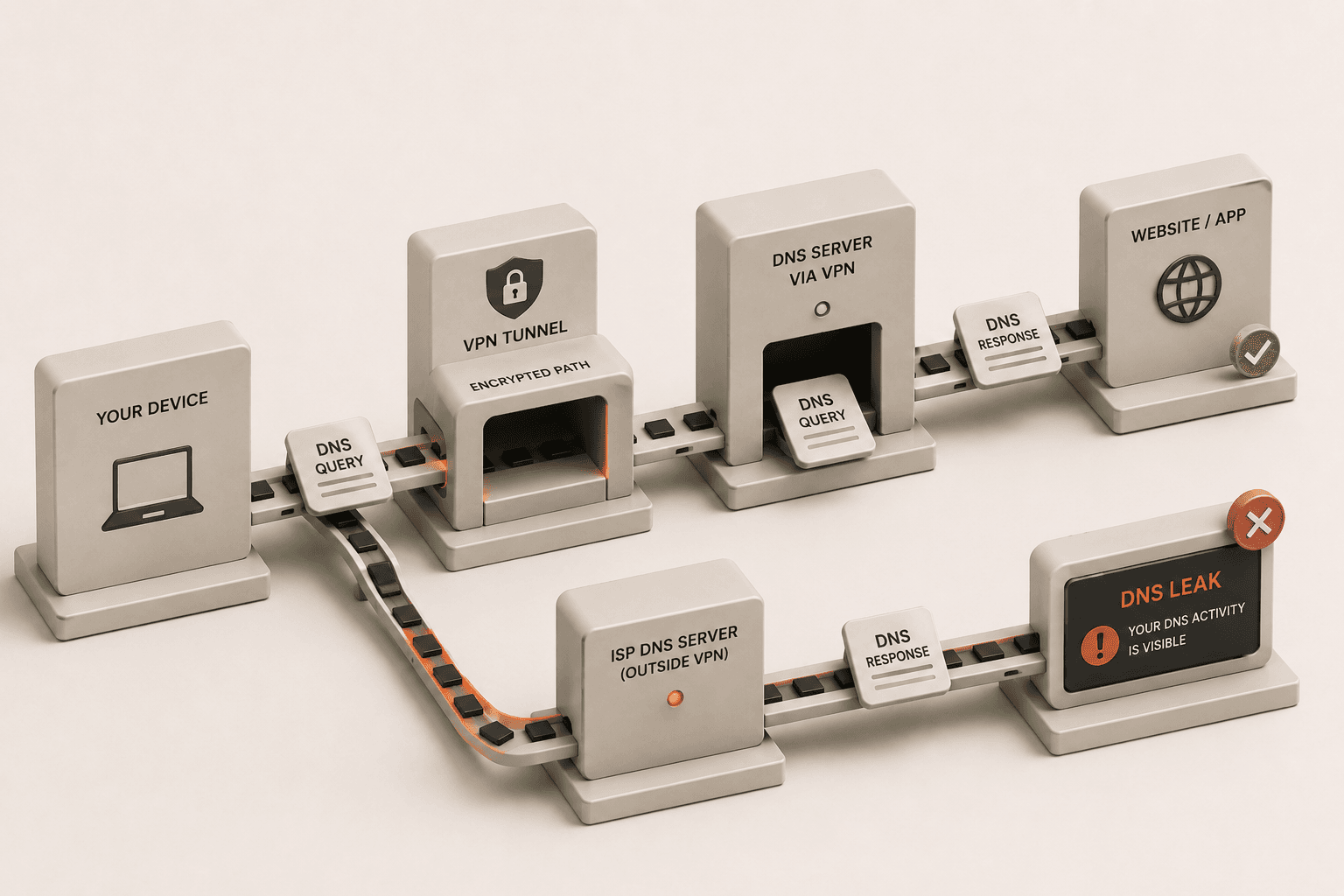
When you connect to the internet through a Virtual Private Network (VPN), you expect your online activities to remain entirely private. You assume that your internet traffic is encrypted and your real IP address is hidden. However, this is not always the case. A critical security flaw known as a DNS leak can compromise your anonymity without you even realizing it.
The Domain Name System (DNS) acts as the phonebook of the internet. It translates human-readable website names, like aivorizetools.com, into numerical IP addresses that computers use to connect to each other. Whenever you type a URL into your browser, your device sends a DNS request to find the corresponding IP address. In a secure setup, your VPN should handle this request. When it fails to do so, a leak occurs.
What exactly is a DNS leak?
A DNS leak occurs when your internet browsing requests bypass your VPN tunnel and are routed through your Internet Service Provider's DNS servers instead. This means that while your actual data payload might be encrypted by the VPN, the requests detailing which websites you are asking to visit are sent outside the secure tunnel in plain text.
Normally, when you activate a high-quality VPN, it forces all your internet traffic, including DNS queries, through its own encrypted servers. This ensures that your Internet Service Provider (ISP) and any eavesdroppers cannot see where you are navigating. However, during a DNS leak, the operating system defaults back to the default DNS servers assigned by your ISP. Consequently, your ISP regains visibility into your browsing habits.
The danger of this situation lies in its subtlety. Your VPN software might display a green "connected" status, and your IP address might appear altered if you check it. Everything looks secure on the surface. Yet, in the background, your device is quietly sending a log of every website you visit directly to your ISP, rendering the privacy aspect of your VPN entirely useless.
How does a DNS leak happen?
A DNS leak typically happens due to network misconfigurations, operating system quirks, or using a VPN service that lacks built-in DNS protection. The most common culprit is how Windows handles network configurations. Windows features a tool called "Smart Multi-Homed Named Resolution," which sends DNS requests to all available servers simultaneously and accepts the fastest response. If your ISP's DNS server replies faster than your VPN's server, a leak happens.
Another frequent cause involves manual network settings. If you or a network administrator previously hardcoded specific DNS servers into your router or device settings, these can sometimes override the settings applied by your VPN software. When the VPN attempts to route your DNS requests through its secure servers, your device stubbornly clings to the manual configuration, sending requests outside the encrypted tunnel.
Also, network transitions often trigger leaks. When you switch from a Wi-Fi network to a cellular network, or when your computer wakes from sleep mode, the network interface resets. During this brief window, your device might send out DNS requests using the default ISP servers before the VPN has fully re-established its secure connection, leading to intermittent but damaging leaks.
Why are DNS leaks dangerous for your privacy?
DNS leaks are dangerous because they expose your entire browsing history, visited websites, and online habits directly to your Internet Service Provider. Even though the specific pages you read or the passwords you enter remain encrypted (assuming the website uses HTTPS), the very fact that you visited those websites is recorded. This metadata is highly revealing and can paint a comprehensive picture of your life.
Your ISP can track your political affiliations, medical inquiries, financial institutions, and personal interests simply by logging your DNS requests. In many countries, ISPs are legally permitted to collect this data and sell it to third-party advertising agencies, data brokers, or marketing firms without your explicit consent. You might start seeing highly targeted advertisements based on websites you thought you visited privately.
Beyond marketing, this data exposure poses severe risks in restrictive environments. If you reside in a region with strict internet censorship or surveillance, a DNS leak can reveal attempts to access blocked content or communicate with restricted platforms. Government agencies can subpoena this information from your ISP, leading to potential legal consequences or targeted surveillance based on your exposed browsing history.
Should I be worried if my DNS is leaking?
You should be worried if your DNS is leaking because it completely defeats the primary purpose of using a VPN for online privacy and anonymity. If you are paying for a VPN service specifically to keep your digital footprint hidden from your ISP, a DNS leak means you are not getting what you paid for. You have a false sense of security while your data is actively being exposed.
Worry is especially justified if you are handling sensitive information. Journalists communicating with confidential sources, activists organizing in oppressive regimes, or individuals conducting sensitive business transactions rely on VPNs to prevent local network monitoring. A DNS leak in these scenarios can compromise operational security, expose sources, or reveal trade secrets to competitors or hostile entities monitoring the local network.
Even for everyday users, the principle of privacy matters. You should be concerned that entities are profiting off your data without your permission. A leaking DNS connection means your digital profile is being actively constructed and sold. Taking steps to secure your DNS ensures that your right to digital privacy is maintained, regardless of what you are doing online.
How can I tell if my DNS is currently leaking?
You can tell if your DNS is leaking by running a specialized online DNS leak test while connected to your VPN. These testing websites are designed to force your browser to make a series of DNS requests and then analyze where those requests originated. The process is simple, fast, and does not require any technical expertise to perform.
To perform the test, first ensure your VPN is turned on and connected to a server of your choice. Next, open your web browser and navigate to a reputable DNS leak testing website, such as dnsleaktest.com or a similar tool provided by privacy organizations. Click the button to start the extended or standard test. The website will display a list of IP addresses and server locations that handled your DNS requests.
Analyze the results carefully. If the servers listed belong to your VPN provider and are located in the region you connected to, your connection is secure. However, if the results show servers belonging to your actual ISP (like Comcast, AT&T, or your local provider), or if they show your real geographical location, you have a DNS leak. The presence of any server not owned by your VPN indicates a privacy breach.
How do I test for a DNS leak right now?
The fastest way is to use a dedicated tool that forces fresh DNS lookups and shows you exactly which servers resolved them. If you see your ISP's servers listed, your DNS is leaking.
Run the Aivorize DNS Leak Test - it takes about 5 seconds and shows you every DNS resolver that handled your traffic. No sign-up required.
Related tools and reading
- DNS Leak Test - run a free, instant DNS leak check right now
- WebRTC Leak Test - check if your browser is leaking your real IP via WebRTC
- VPN Check - compare your IP before and after connecting to verify your VPN is working
- How to Test WebRTC Leaks in Your VPN Connection
- Why Is Your VPN Not Hiding Your IP Address?