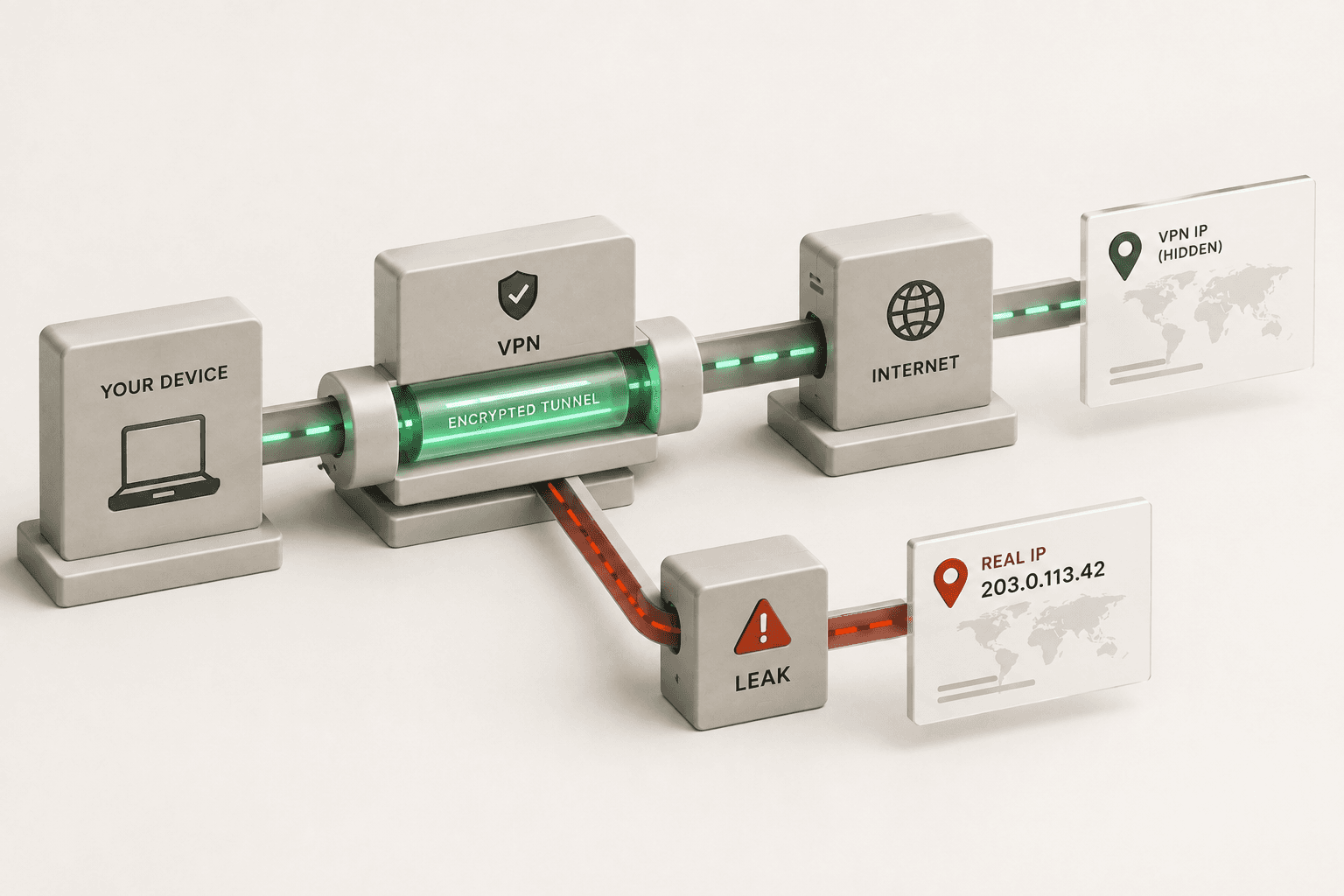
You bought a VPN to stay anonymous, but a quick check reveals your real IP address is still visible. If your VPN is not hiding your IP address, you are likely experiencing a leak or a connection failure - most often a dropped connection, a WebRTC leak, an IPv6 misconfiguration, or a DNS leak. This guide covers the exact reasons and how to fix each one.
Not sure which one applies to you? Run a full check first.
Run VPN Leak TestWhy Is My IP Address Leaking When I Use a VPN?
Your IP address is leaking because of a dropped connection, WebRTC leaks, IPv6 misconfigurations, or DNS leaks. When these issues occur, your device bypasses the encrypted VPN tunnel and sends traffic through your default ISP connection, exposing your real location.
The most common cause is a momentary drop in your VPN connection. If your internet briefly disconnects, your device might instantly reconnect using your standard, unencrypted network before the VPN app can re-establish its secure tunnel. Without a safeguard, your real IP is broadcast to every site you visit during that window. Other causes, like WebRTC vulnerabilities in your browser or an operating system defaulting to IPv6, can also expose your identity without you even noticing the connection has dropped.
What Is a WebRTC Leak and How Do I Fix It?
A WebRTC leak occurs when your web browser exposes your real IP address while using real-time communication features, even if your VPN is active. You can fix WebRTC leaks by disabling WebRTC in your browser settings or using a dedicated extension that blocks these requests.
WebRTC (Web Real-Time Communication) is built into modern browsers like Chrome, Firefox, and Edge to support voice and video chat. However, it requires your device's actual IP address to function correctly. If your VPN doesn't specifically block WebRTC requests, websites can easily request and view your true IP address through your browser's APIs. To fix this, look for WebRTC blocking options within your VPN app's settings, or install a trusted browser add-on specifically designed to plug WebRTC leaks. Some privacy-focused browsers also allow you to turn off WebRTC completely in their advanced settings. You can confirm whether this is happening to you right now with our WebRTC Leak Test.
What Is a DNS Leak and How Do I Stop It?
A DNS leak happens when your device sends website lookup requests outside the VPN tunnel to your default ISP servers. You can stop DNS leaks by enabling the DNS leak protection feature in your VPN app settings or manually configuring your network to use secure DNS servers.
When you type a URL into your browser, the Domain Name System (DNS) translates it into an IP address. A secure VPN should route all these DNS requests through its own encrypted servers. If your system defaults back to your ISP's DNS servers, your ISP (and anyone spying on the connection) can see exactly which websites you are visiting, even though the content itself remains encrypted. Ensure “DNS Leak Protection” is toggled on in your VPN client, or run our DNS Leak Test to check right now.
Does IPv6 Cause IP Address Leaks?
Yes, IPv6 can cause IP address leaks if your VPN provider only supports the older IPv4 standard. When your device tries to use an IPv6 address, the traffic may completely bypass the VPN tunnel, revealing your actual identity.
Many VPNs still do not fully support IPv6. If your ISP assigns you an IPv6 address and you visit a website that supports it, your traffic might travel outside the encrypted VPN connection. To prevent this, check if your VPN app has a setting to “Block IPv6 traffic.” Alternatively, you can disable IPv6 entirely in your operating system's network adapter settings. This forces all traffic over the supported IPv4 standard, ensuring the VPN tunnel captures everything leaving your device securely.
4-Step Troubleshooting Checklist
If you just discovered your VPN is leaking, run through this 4-step diagnostic checklist to secure your connection:
- Check the Kill Switch: Open your VPN app settings and ensure the "Kill Switch" or "Network Lock" is toggled ON. This prevents data escaping if the tunnel drops.
- Verify DNS Settings: Ensure your VPN is set to use its own secure DNS servers. Turn on "DNS Leak Protection" if your provider offers a dedicated toggle for it.
- Disable WebRTC in Browser: If the leak only happens in your web browser, install a WebRTC blocking extension (like uBlock Origin with WebRTC blocked) or disable WebRTC in the browser's advanced flags.
- Disable IPv6: Go to your Windows or Mac network adapter settings and uncheck "Internet Protocol Version 6 (TCP/IPv6)" to force all traffic through the heavily supported IPv4 standard.
What Is a Kill Switch, and Why Do I Need It?
A kill switch is a VPN security feature that blocks all internet traffic if your VPN connection drops unexpectedly. You need it to prevent your real IP address from being exposed during the seconds or minutes it takes for your VPN to reconnect.
VPN connections can fail for various reasons, including server restarts, switching Wi-Fi networks, or poor internet stability. Without a kill switch, your device will default back to your standard, unprotected connection immediately. A kill switch acts as a failsafe; it cuts your internet access entirely until the secure VPN tunnel is re-established. Always ensure this feature is turned on in your VPN settings for continuous protection. It is non-negotiable if you are handling sensitive information or relying on the VPN for anonymity.
Can Free VPNs Leak My IP Address?
Yes, free VPNs are significantly more likely to leak your IP address because they often lack essential security features like DNS leak protection and automatic kill switches. Free services may also intentionally log and sell your data, negating the privacy benefits.
Running a reliable VPN infrastructure is expensive. Free providers often cut corners on development and security protocols. They might use outdated encryption standards or fail to patch known vulnerabilities like WebRTC leaks. Additionally, the software itself is often less robust, leading to frequent disconnects. If absolute privacy is your goal, rely on a reputable, paid VPN service that explicitly outlines its leak protection features, undergoes third-party security audits, and adheres to a strict no-logs policy.
How Can I Check If My VPN Is Hiding My IP Address?
You can check if your VPN is hiding your IP address by running a leak test while connected to your VPN. Compare the displayed IP address with your actual IP address to ensure they do not match. Disconnect your VPN and note your real IP, then reconnect to a server in a different location and run the tests again. If the test shows your real IP address or lists your actual ISP in the DNS section, your VPN is leaking and requires immediate troubleshooting.
Related Reading
- Free Tools to Test Your VPN for Leaks
The full toolkit for auditing your VPN connection in one place.
- How Do I Know If My VPN Is Actually Hiding My IP Address?
A step-by-step before-and-after comparison to confirm your VPN is doing its job.
Useful Tools
- VPN Check
Record your baseline IP, connect your VPN, then compare.
- WebRTC Leak Test
Check whether your browser is exposing your real IP through WebRTC.
- DNS Leak Test
See exactly which DNS servers are resolving your browsing.